
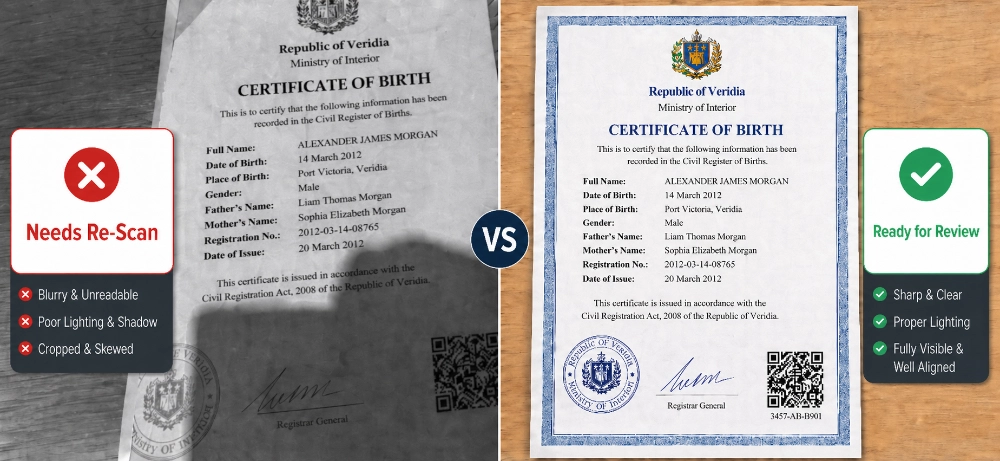
TL;DR: A clear scan helps your certified translation move faster and reduces the chance of delays. Before sending your file, check that every page, stamp, signature, date, and document number can be read without guessing.
Key Takeaways
Before anyone can translate your document, they need to read it clearly. In the UAE, where certified translations are often submitted to courts, embassies, ministries, immigration offices, universities, banks, and business authorities, a blurry scan or missing stamp can delay the whole process.
The scan does not need to be perfect, but it does need to show the full document clearly. Every word, number, seal, signature, QR code, handwritten note, and page edge should be easy to read before you send it for translation.
Certified translation is not just changing words from one language to another. It is a formal translation prepared for official use, usually with a stamp, signature, and format that helps the receiving authority compare it with the original document.
In the UAE, the required format depends on where the document will be submitted. Some documents may need Ministry of Justice certified legal translation, while others may need company-certified translation, embassy-ready formatting, notarisation support, or translation for academic, immigration, legal, or business use.
Small details matter in official documents. If a passport number is blurry, a date is hidden by glare, or a seal is cut off, the team may need another copy.
A clear scan helps the translator get it right the first time and reduces corrections later.
Before you scan the document, check where the translation will be submitted and what type of certified translation they accept. This simple step can save you from ordering the wrong service or having to redo the translation later.
Ask the right office or contact person if they need a specific format, especially for documents such as:
If you are unsure, confirm the requirement with the receiving authority, lawyer, PRO, embassy, university, bank, or government counter before sending the file.
When you contact Vision Translation, share the document type, language pair, receiving authority, deadline, and delivery preference. Also mention if you need a stamped hard copy, digital copy, courier delivery, attestation guidance, or embassy support. These details help the team quote accurately and avoid rework.
A common mistake is scanning only the main text while cutting off margins, headers, footers, or stamp areas. These sections may contain reference numbers, seals, signatures, QR codes, page numbers, or official notes.
Place the full page inside the scanning frame and leave a small border around the document. This shows that no part of the page has been cut off.
If the document has writing, stamps, notes, or marks on the back, scan the back as well. Even a short note or stamp can matter when the document is reviewed for official use.
For multi-page documents, include every page in the same order as the original. If you cannot combine the pages into one PDF, rename the files clearly so the translation team can follow the correct sequence.
Black-and-white scans can hide details that matter. Many UAE documents include coloured stamps, seals, signatures, QR codes, watermarks, letterheads, and authority marks that should remain visible.
Use colour scanning whenever the document includes any official mark or security detail. Avoid filters, heavy contrast, beauty modes, and artificial sharpening because they can change the way the document looks.
After scanning, zoom in on the smallest text, stamp edges, QR codes, and barcodes. If you cannot read those details on your own screen, the translation team may also have trouble reading them.
Do not judge the scan only by how it looks when zoomed out. Certified translation depends on names, dates, numbers, seals, and handwritten notes being clear.
Names, dates, and document numbers must match your IDs and records. If a name appears in Arabic, Russian, Chinese, Hindi, Urdu, Farsi, or another script, send an ID copy with the preferred English spelling so the translation matches your official documents.
Dates can be easy to misread, especially when the scan is faint, handwritten, or uses a different format. If a date looks unclear or partly hidden, mention it when you send the file. It is better to confirm it early than fix the certified translation after submission.
A phone photo is fine if it looks like a proper scan. Place the document on a flat surface, use good light, and hold the phone directly above it. Keep all four corners visible, straighten the page, and avoid shadows or glare on the text, stamp, or seal.
For passports, diplomas, certificates, old records, or faint stamps, take an extra close-up if needed. A clear close-up helps the team read small details that may not show well in the full-page photo. Treat the image like part of the official process, not a quick snapshot.
Some documents already come in Word, PDF, Excel, or design files. If you have an editable version, send it with the signed, stamped, or scanned copy. The scan confirms the official source, while the editable file helps the team keep tables, formatting, terms, and layout accurate.
Use the official document as the main source, not a version typed by hand. If you have both a scan and an editable file, send both. The scan confirms the real document, while the editable file can help with formatting and layout.
Tell the translation team where the document will be submitted, such as MOFA, a court, an embassy, immigration, a bank, a free zone, or a university. Also share your deadline and delivery needs, whether you need a digital copy, stamped hard copy, courier, urgent handling, or attestation guidance.
Send related documents early if they affect names, dates, numbers, or wording. For example, a birth certificate may need to match a passport, and a trade licence may need to match company records. This helps the team keep the translation consistent with the documents you already use.
Before sending your document, review the file as if you were the person checking the application. The goal is to remove simple reasons for the translation team to ask for a replacement scan.
Vision Translation understands how UAE authorities review official documents, not just how to translate words. Whether you need help with a personal certificate, immigration file, court document, business contract, academic record, or company paperwork, the team can support you with professional translation services in the UAE and guide you before submission.
This early check can help prevent delays caused by missing pages, unclear stamps, inconsistent name spellings, or the wrong certification type. You can also discuss deadlines, hard copies, courier options, confidentiality, attestation, or embassy-related steps before the work starts.
Certified translation is often needed for important personal, legal, academic, or business steps, so a weak scan should not be the reason your file gets delayed or returned. Prepare the scan carefully, explain where the document will be used, and work with a team that knows UAE document requirements.
 Arabic
  English
  French
  Spanish
  Chinese
  Russian